
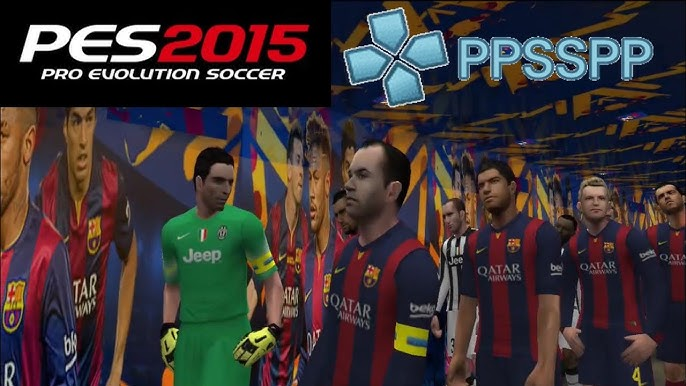
Quick answer: PES 2015 PPSSPP refers to playing Pro Evolution Soccer through the PPSSPP emulator, which runs PSP games on Android, iOS, Windows, and other devices. To play, you need the PPSSPP emulator app and a PES game ISO file. Once both are installed, you can load the game and enjoy console-style soccer on your phone or computer.
Few mobile soccer experiences match the depth of a full PES title—and that’s exactly why fans keep returning to PPSSPP. The emulator lets you relive classic Pro Evolution Soccer gameplay on modern devices, complete with smooth controls, tweakable graphics, and the tactical play that made the series famous.
This guide walks you through what PES 2015 PPSSPP actually is, how the emulator works, how to set it up, and how to get the best performance on your device. By the end, you’ll know exactly what you need to start playing and how to avoid the most common pitfalls.
What is PPSSPP and how does it work?
PPSSPP is a free, open-source emulator that recreates the PlayStation Portable (PSP) system on other hardware. Developed by Henrik Rydgård and first released in 2012, it lets you run PSP games on Android, iOS, Windows, macOS, and Linux.
The emulator reads game files known as ISO or CSO files. These are digital copies of PSP game discs. PPSSPP translates the game’s original code so it can run on your device’s processor, then upscales the graphics to take advantage of modern screens.
The big appeal is flexibility. You can render games at higher resolutions than the original PSP ever managed, map controls to a touchscreen or a Bluetooth gamepad, and save your progress at any moment. For sports titles like Pro Evolution Soccer, this means sharper visuals and responsive controls on a device that fits in your pocket.
What do you need to play PES on PPSSPP?
To get a PES game running through PPSSPP, you need two core components:
- The PPSSPP emulator — Available free from the official PPSSPP website and major app stores. A “Gold” version exists too, but the free version offers the same features and simply supports the developer.
- A PES game ISO file — This is the actual game file the emulator loads. You should only use ISO files of games you legally own.
- Enough storage space — PSP soccer titles typically range from around 500 MB to 1.5 GB, so make sure your device has room.
- A capable device — Most mid-range and high-end phones from the last few years handle PSP emulation comfortably.
A legal note matters here: downloading game ISOs you don’t own is piracy in most countries. The safest, lawful route is to create an ISO from a PSP disc or UMD you already purchased.
How to set up PES 2015 on PPSSPP step by step
Setting up a PES title on PPSSPP follows the same process regardless of which year’s edition you use. Here’s how it works:
Step 1: Install the PPSSPP emulator
Download PPSSPP from the official source for your platform. On Android, you’ll find it on the Google Play Store. For Windows or Mac, grab the installer from the PPSSPP website. Install it like any other app.
Step 2: Add your game ISO file
Move your legally obtained PES ISO file into a folder on your device. On Android, a dedicated “PSP” or “Games” folder keeps things organized. Make sure you remember the location.
Step 3: Load the game
Open PPSSPP and use the built-in file browser to navigate to your ISO file. Tap or click the file, and the game will begin loading. The first launch may take a little longer as the emulator processes the file.
Step 4: Configure your controls
Head into the settings menu to map your controls. PPSSPP offers an on-screen touch layout by default, but pairing a Bluetooth controller delivers a far better soccer experience. Adjust button placement and size until it feels comfortable.
Step 5: Save your progress
Use PPSSPP’s save state feature to capture your game at any point. This is separate from the in-game save system and lets you resume instantly. Get into the habit of saving before tense moments.
How do you improve performance and graphics?
If a PES title runs slowly or stutters, a few settings can make a real difference:
- Lower the rendering resolution. Higher resolutions look sharper but demand more power. Dropping from 3x to 2x often smooths out gameplay on weaker devices.
- Enable frame skipping. A small amount of frame skipping can stabilize the frame rate during busy matches.
- Turn on “Buffered rendering.” This setting usually produces the most reliable results for sports games.
- Close background apps. Free up your device’s memory and processor before launching a match.
- Update PPSSPP. Newer versions frequently include performance and compatibility fixes.
Experiment one setting at a time. That way, you’ll know exactly which change helped and which didn’t.
Is PES on PPSSPP worth playing today?
For fans of older Pro Evolution Soccer titles, PPSSPP is one of the best ways to revisit them. The combination of upscaled graphics, controller support, and save states arguably improves on the original PSP experience.
That said, newer mobile soccer games offer modern rosters, online play, and ongoing updates. Choose PPSSPP if you value classic gameplay, full control over your matches, and offline play. Choose a current mobile title if up-to-date teams and online competition matter more to you.
Frequently asked questions
Is PES 2015 PPSSPP free to play?
The PPSSPP emulator itself is free and open-source. However, you must legally own any PES game you load through it. Using game ISO files you don’t own counts as piracy in most countries.
Can I play PES on PPSSPP without a controller?
Yes. PPSSPP includes an on-screen touch control layout that works out of the box. That said, a Bluetooth gamepad gives you much more precise control, which makes a noticeable difference in fast-paced soccer matches.
What devices can run PPSSPP?
PPSSPP runs on Android, iOS, Windows, macOS, and Linux. Most mid-range and high-end smartphones from the last few years handle PSP emulation smoothly, though older or budget devices may struggle with demanding titles.
Why does my PES game lag on PPSSPP?
Lag usually comes from settings that are too demanding for your device. Lower the rendering resolution, enable buffered rendering, try light frame skipping, and close background apps. Keeping PPSSPP updated also helps with performance.
Is it legal to download PES ISO files?
Downloading ISO files for games you don’t own is illegal in most countries. The lawful approach is to create an ISO from a PSP disc or UMD you already purchased.
Start playing on your own terms
PES 2015 PPSSPP brings console-quality soccer to whatever device you carry, as long as you set it up correctly and play within the law. Install the emulator, load a game you own, fine-tune your controls and graphics, and you’ll have a portable soccer experience that holds up remarkably well.
Start with the basics, adjust your settings to match your device, and you’ll be running matches smoothly in no time.

 GrandEuropeanClinic
  marshakaplan766